What Is Apple Intelligence?
A plain-English overview of Apple Intelligence (the on-device-first personal AI layer in iPhone, iPad, and Mac) and the kickoff to a 6-part series on why local AI is worth paying attention to.
This is Part 1 of a 6-part series on Apple Intelligence. A new part goes live each day this week.
I recently started poking around with Apple Intelligence, and I got more interested than I expected to. Most of the AI conversation right now is about giant models living in giant data centers, so the part that pulled me in was the opposite bet: making a small model that runs on the phone in your pocket genuinely useful. I care about that for two specific reasons, privacy and cost, and that’s the lens for this whole series.
So this is Part 1 of six posts I’m publishing this week, one a day. Consider this the map.
What Apple Intelligence actually is
Apple Intelligence is a system-level personal-AI layer built into iPhone, iPad, and Mac that handles language, images, and actions, and is designed to run as much as possible directly on your device, only reaching out to the cloud when a request is too big to handle locally. It is not a single chatbot app you open. It’s plumbing that shows up inside the apps you already use (rewriting an email, summarizing a long thread, cleaning a photo, making a Genmoji).
Apple announced it at WWDC in June 2024 and shipped the first features in October 2024 with iOS 18.1. That’s the thing to hold onto: it’s an assistive layer woven through the operating system, not a destination you visit.
The three tiers, at a glance
The cleanest way I’ve found to picture how it decides where your request goes is to imagine a smart junior assistant at a desk.
- The desk (on-device). A small model runs right on your phone or Mac. It handles most requests instantly, offline, and for free. This is where Apple wants the work to happen.
- The locked, audited room (Private Cloud Compute). When a request is too heavy for the desk, it goes down the hall to a specialist team behind a locked door, on Apple’s own private servers built so that (by Apple’s design) your data isn’t stored and no one, not even Apple, can look inside.
- The outside consultant (ChatGPT). For open-ended world-knowledge questions, there’s an optional hand-off to ChatGPT, but it works like calling in an outsider: your phone asks you first, every time.
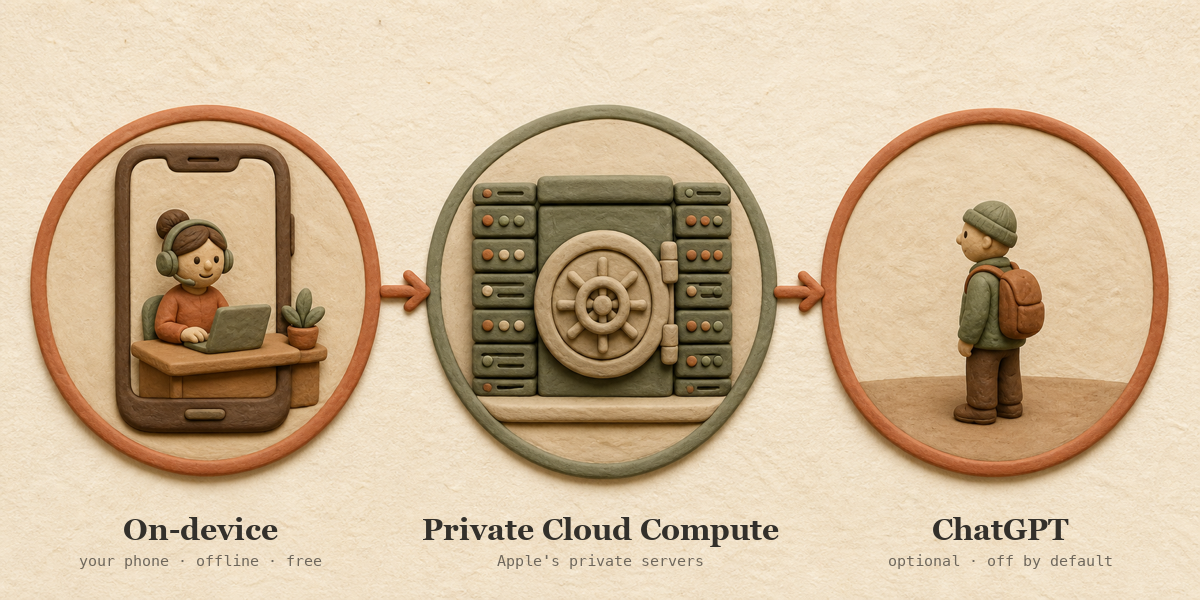
That’s the whole architecture in one breath. Part 3 takes the two Apple models apart properly (sizes, quantization, why the same model ships to every device today).
It is not the same thing as Siri
This trips people up, so it’s worth being precise. Apple Intelligence is the system. Siri is one surface that the system upgrades, alongside Writing Tools, Photos, and the rest. Siri got a new look, Type to Siri, and a more natural voice back in 2024.
The fully agentic Siri (the one that reads your screen, pulls personal context, and takes actions across your apps) is a separate story, and it is not generally out yet. Apple reintroduced it as “Siri AI” at WWDC 2026. As of today it’s in beta, with general release expected this fall alongside iOS 27. Part 2 tells the full history of how that piece got promised, delayed, and renamed.
Why this matters
Here’s the heart of it, and why I think this is worth your attention even if you don’t own an iPhone.
- Private by design. If the work happens on your device, your data never leaves it, so there’s nothing to intercept, store, or leak.
- Free, or close to it. On-device inference has no per-request bill. Apple also gives developers offline, no-token-cost access to the same on-device model through its Foundation Models framework, which means a lot of AI features can now be built with zero cloud cost.
- It works offline. On a plane, in a dead-signal parking garage, out on a trail: the on-device model doesn’t care. That’s a real difference from anything that has to phone home to answer you.
Private, cheap, and offline. That’s the local-first thesis, and it’s the thread running through all six posts.
My “wild West” read (this part is opinion)
I’ll flag this clearly as my opinion, because I can’t prove it. In my view, the field right now is chasing raw performance and new use cases more than it’s chasing privacy or cost. That’s understandable (the capability jumps have been huge), but I expect the priorities to shift toward cost and privacy over the next few years as on-device models get good enough for more of the everyday jobs.
To be honest about the other side: the actual near-term trajectory looks hybrid, not on-device-takes-over. Apple itself is scaling up its cloud at the same time it pushes work onto your phone. So the smarter framing is “more local where local is good enough,” not “local replaces the cloud.” Part 6 picks this thread back up and gets into where I think it goes.
The week ahead
Five more posts, dropping daily:
- History and the Siri story. The promised-then-delayed personal Siri, and how it became “Siri AI.”
- The two models, on-device vs. cloud. What actually runs where, and how your phone decides.
- Privacy, and what it means for builders. The real guarantees, and why “free, private, offline” changes what developers can ship.
- 10 things you can do right now. Hyper-practical, phone-first, mostly offline (including the Shortcuts trick I keep coming back to).
- The future, and why it’s worth your time. Where local AI is headed, and my predictions for how Apple plays it.
What’s next
I went into this expecting a gimmick and came out thinking the local-first idea is the interesting part of AI right now, not the sideshow. The next five posts are me showing my work.
If you want to catch the rest as it drops this week, the site has an RSS feed you can point your reader at. See you tomorrow for the history.
Frequently asked questions
What is Apple Intelligence? It’s Apple’s built-in personal-AI system for iPhone, iPad, and Mac. It powers writing help, image features, summaries, and smarter actions, and it’s designed to run on your device first and only use the cloud when a task needs it.
Is Apple Intelligence the same as Siri? No. Apple Intelligence is the underlying system; Siri is one part of it that got upgraded. The deeper, “do things across your apps” assistant (now called Siri AI) is in beta as of mid-2026, with general release expected in the fall alongside iOS 27.
Does Apple Intelligence work offline? The on-device features do. Writing help, summaries, and other local tasks run without a connection. Only requests that get sent to Apple’s servers or to ChatGPT need the internet.
Is Apple Intelligence free? Yes for the built-in features. Developers also get free, offline access to the same on-device model through Apple’s Foundation Models framework, so many app features can be built with no cloud bill.
Which devices support Apple Intelligence? iPhone 15 Pro and Pro Max, iPhone 16 and later, iPads and Macs with an M1 chip or newer (plus the A17 Pro iPad mini). The common thread is at least 8 GB of memory.